SymphonyAI Apex 2.0

Intelligent ITSM. 
Built for Intelligent Enterprises

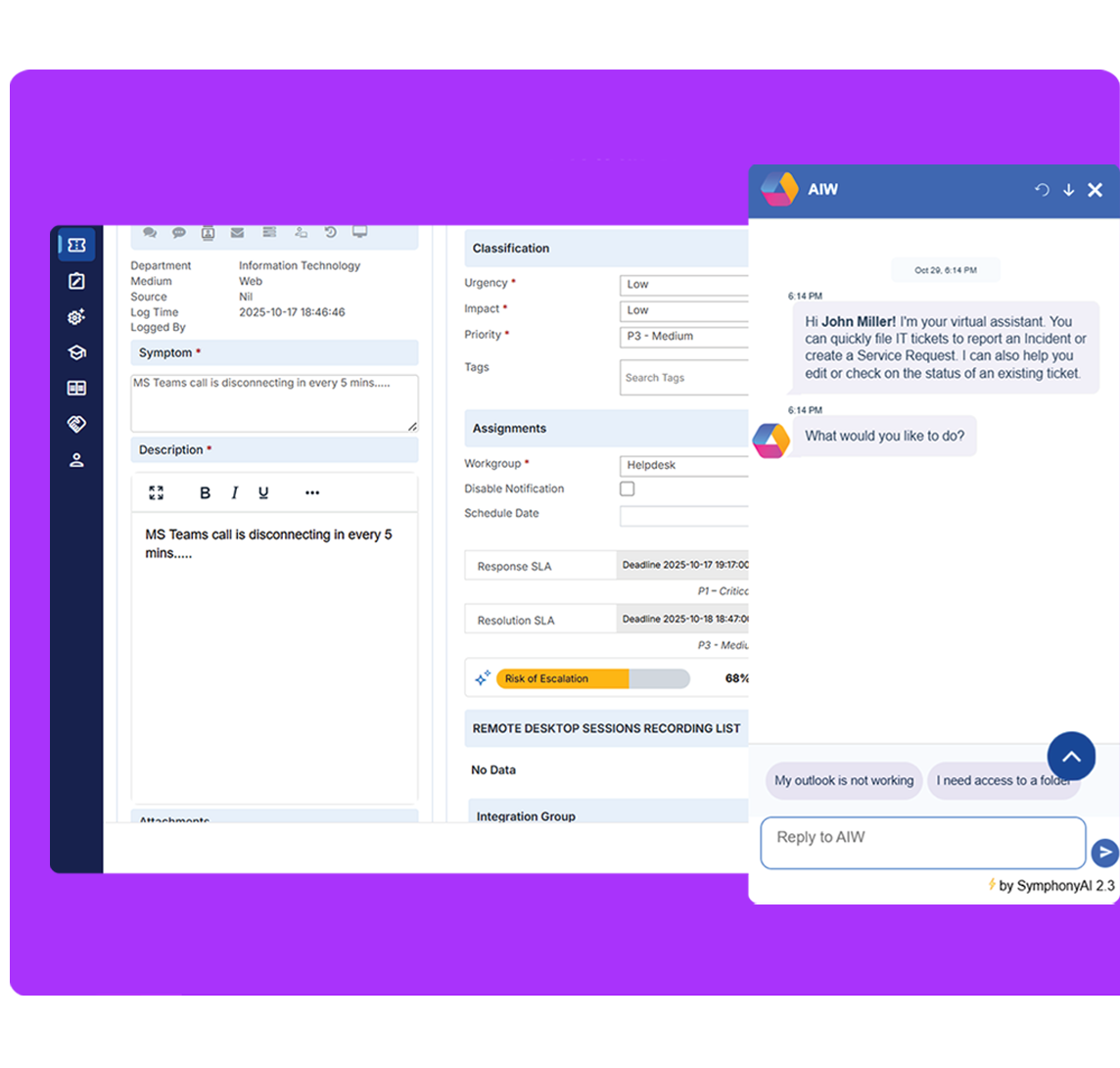
SymphonyAI Apex 2.0 redefines what enterprise IT service management can be. Built with AI, automation, and seamless integration at its core, Apex 2.0 empowers you to deliver faster, smarter, and more cost-effective services that align with business priorities.

Abstract black and white digital art featuring smooth, curving, ribbon-like lines twisting and flowing against a black background.
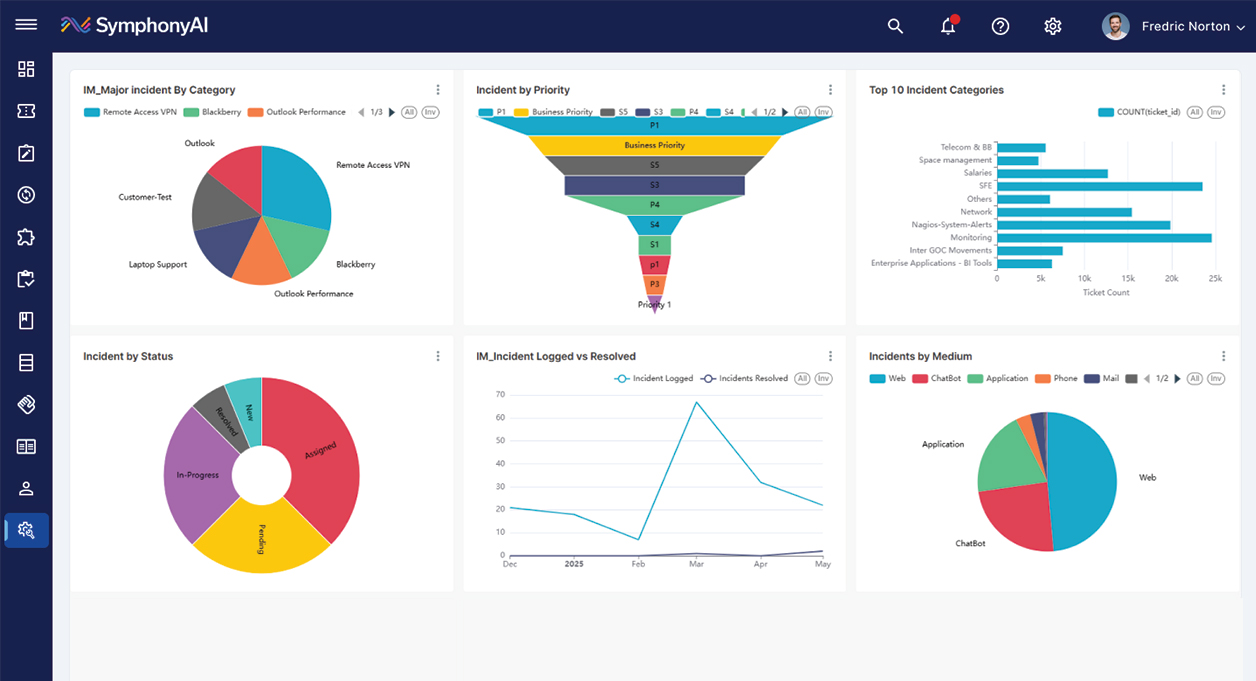
SymphonyAI dashboard displaying six charts: a pie chart of major incidents by category including Remote Access VPN, Blackberry, Outlook Performance, Outlook, Customer-Test, Laptop Support; a funnel chart showing incidents by priority levels from Business Priority to Priority 1; a bar chart of top 10 incident categories with ticket counts; a donut chart showing incidents by status including Assigned, Pending, In-Progress, Resolved, New; a line graph comparing incidents logged versus resolved from December to May; and a pie chart of incidents by medium with segments for Web, ChatBot, Application, Phone, and Mail.
Step into the Apex 2.0 to experience Enterprise Service Management with Built-in Intelligence. Transform the Way You Work — Upgrade to Apex 2.0
Redefining Enterprise ITSM

Apex 2.0 is a modern, AI-powered ITSM platform engineered for the enterprise of today—one that demands agility, insight, and measurable outcomes. With Apex 2.0, you can simplify operations, elevate user experience, and turn service management into a true driver of digital transformation.

Experience the power of intelligent service management—faster, simpler, and smarter than ever before. Unlock unparalleled performance and innovative features designed to elevate your workflow. Our guided upgrade path ensures a smooth transition from Summit to the next generation Apex 2.0.

Key Capabilities

Everything you need to deliver faster, smarter, and more cost-effective IT services

Three white sparkling star shapes of different sizes inside a purple circle.
AI Agent & Insights

Empower end-users and analysts with an intelligent agent that enhances user experience

Context-aware assistance
Real-time Analytics & Recommendations
Generate Insights and Summaries
White bar chart with three bars of descending height inside a rounded square, accompanied by a plus symbol in the top right corner.
Reports and Dashboard

Create and view dynamic, data-rich reports that transform raw data into meaningful insights

Visibility into utilization
Refreshed dashboards with intuitive UI
Better forecasting and trend analysis
White stylized QR code icon centered inside a solid purple circle.
Modern User Interface

Experience a intuitive workspace designed to improve navigation and boost productivity

Experience new look of the product
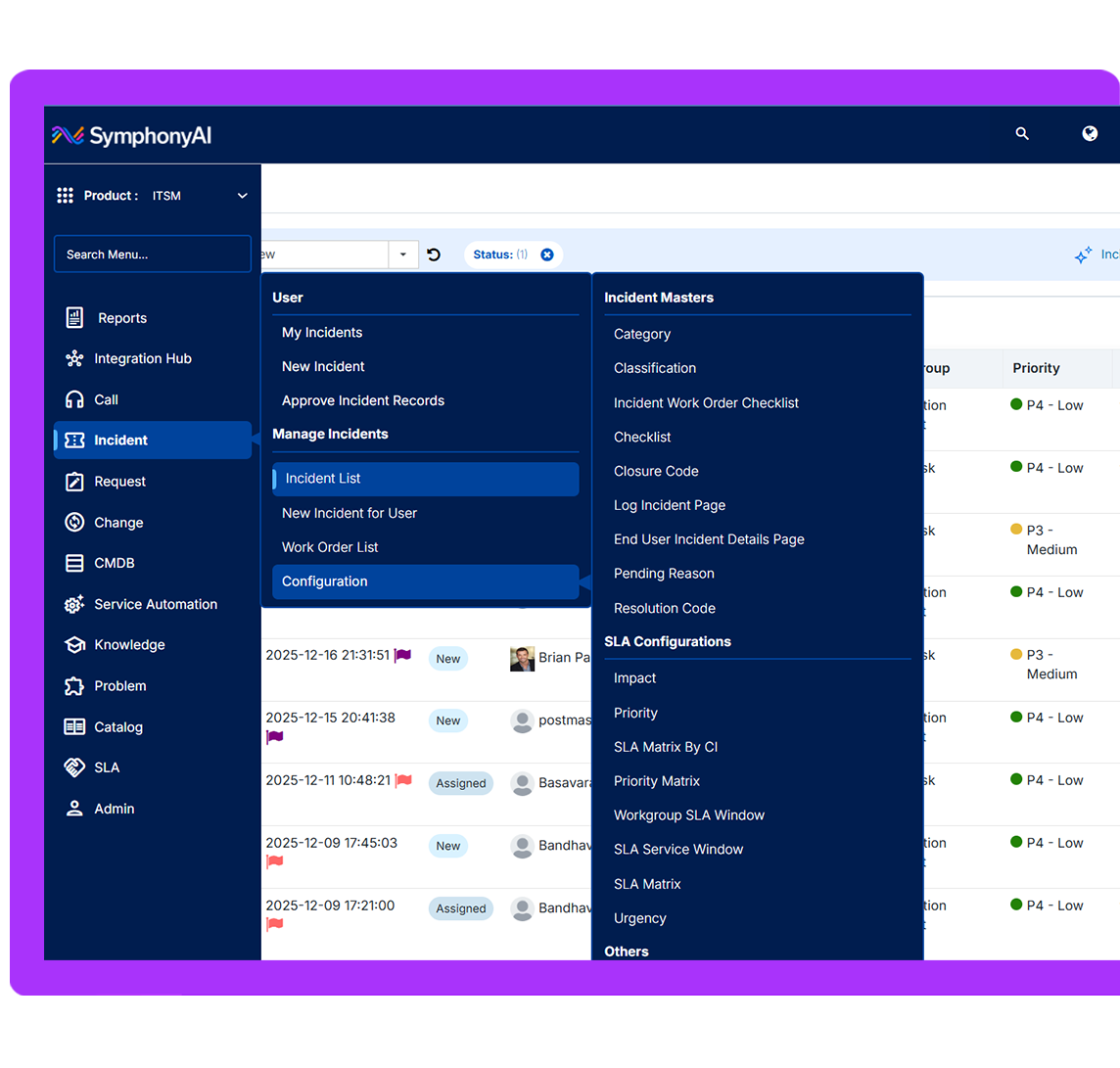
Sleek UI and organized navigation
Access to modules made seamless
White laptop icon inside a purple circle.
Service Automation

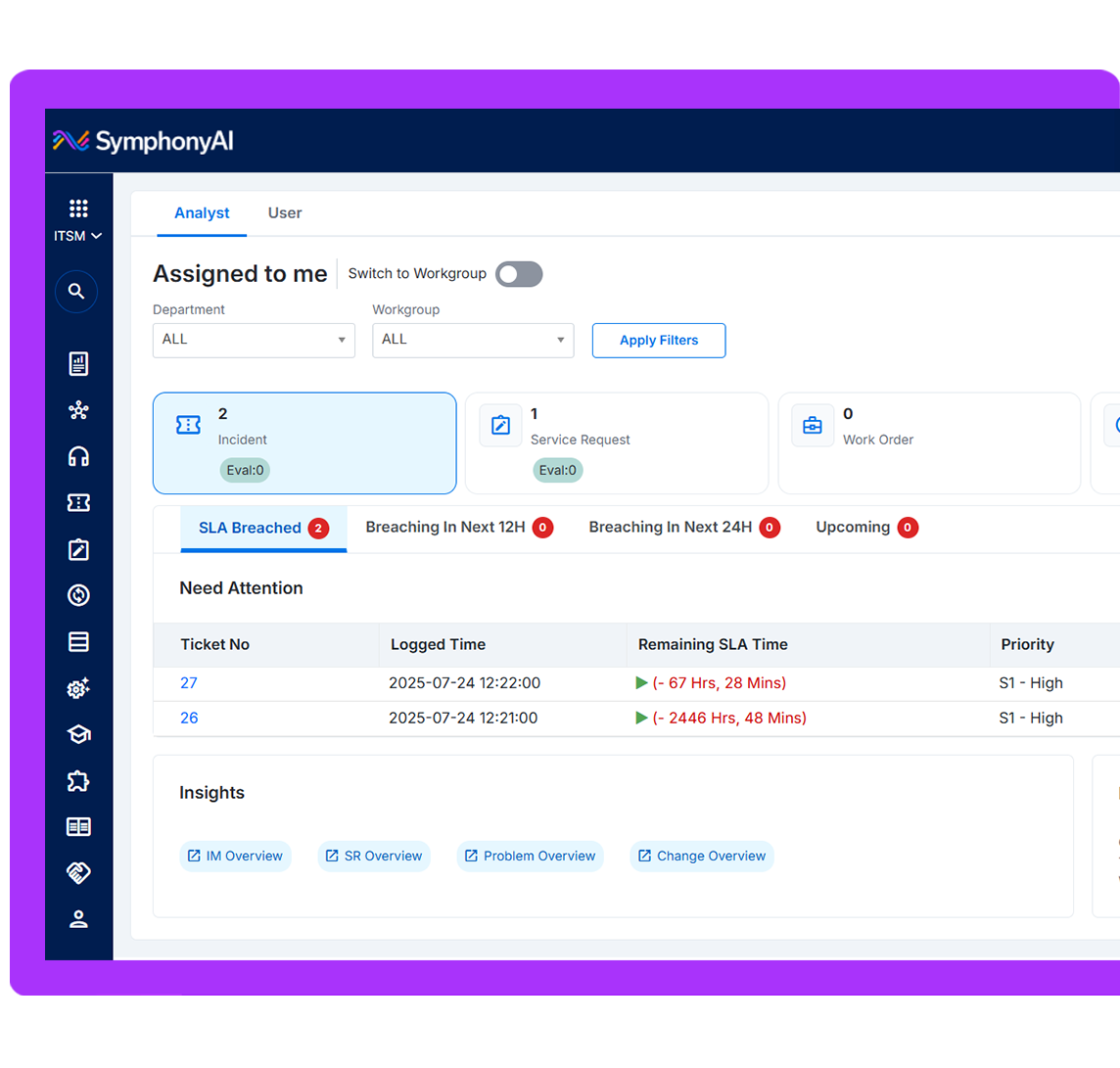
Streamline repetitive tasks, automate approvals and ensure faster service delivery

Enhancing orchestration across core modules
Streamline Workflows
Enabling fast paced IT Operations
White circular diagram with three smaller filled circles inside a larger purple circle.
Integration Hub

Connect effortlessly with your enterprise ecosystem through prebuilt integrations

Flexible and Secure to connect
Improved user adoption rates
Build enterprise workflows
White laptop icon inside a purple circle.
Asset Management

Gain full control of your asset lifecycle with enterprise-ready Asset Management

Seamless hardware & software integration
Hierarchical location tracking
Physical-verification workflows

By combining automation, analytics, and AI, it simplifies workflows, enhances visibility, and empowers teams to act faster with confidence.

Focus Area
Summit
Apex 1.0
Apex 2.0
Legacy UI
User Interface
Modern and refreshed UI enhances user experience
Green check mark inside a green circle symbolizing confirmation or approval.
Modern and refreshed UI enhances user experience
Built in Conversational AI Agents
Script-based chatbots
Non-agentic AI copilot
Green check mark inside a green circle symbolizing confirmation or approval.
Built-in Conversational AI Agents with various use-cases are available on Apex 2.0
Robust reporting platform
Izenda Reporting Framework has limited flexibility
Dev Express
Green check mark inside a green circle symbolizing confirmation or approval.
Apache Super Set that supports Rich Visualization and Customization
In-app Integration Hub with 
1000+ connectors
In-app Integration is not available on Summit
In-App Integration Hub is not available on Apex 1.0
Green check mark inside a green circle symbolizing confirmation or approval.
In App Integration Hub that allows instant connection with 1000+ Apps
Service Automation
Transaction-based add-on is not available
Transaction-based add-on is not available in Apex 1.0
Green check mark inside a green circle symbolizing confirmation or approval.
In-App Service Automation platform for Low code Automation engine

A unified suite of intelligent, automation-driven capabilities designed to streamline IT operations, boost productivity, and deliver real-time insights across the service landscape.

Thick gray downward-pointing chevron arrow with rounded ends.White square with rounded corners inside a purple circle, containing three horizontal white lines of varying length representing a list or menu icon.
Platform
General and Platform Capabilities
Green check mark inside a green circle symbolizing confirmation or approval.
Multi Language Support
Green check mark inside a green circle symbolizing confirmation or approval.
Location Based Mapping
Green check mark inside a green circle symbolizing confirmation or approval.
Authentication Configuration
Green check mark inside a green circle symbolizing confirmation or approval.
Resigned Approver List
Green check mark inside a green circle symbolizing confirmation or approval.
Import Users from AD
Green check mark inside a green circle symbolizing confirmation or approval.
Periodic Surveys
Green check mark inside a green circle symbolizing confirmation or approval.
Currency Configuration
Green check mark inside a green circle symbolizing confirmation or approval.
WCAG / HIPPA / VAPT / GDPR
Green check mark inside a green circle symbolizing confirmation or approval.
Skills Category
Green check mark inside a green circle symbolizing confirmation or approval.
Core Competency
Green check mark inside a green circle symbolizing confirmation or approval.
Gamification
Green check mark inside a green circle symbolizing confirmation or approval.
Password Management
Green check mark inside a green circle symbolizing confirmation or approval.
Social Watch
Green check mark inside a green circle symbolizing confirmation or approval.
Digital Signature
Green check mark inside a green circle symbolizing confirmation or approval.
Shift Management
Green check mark inside a green circle symbolizing confirmation or approval.
Archival
Thick gray downward-pointing chevron arrow with rounded ends.White crossed pencil and ruler icon inside a purple circle.
Design
Design and Admin Specific Roles
Green check mark inside a green circle symbolizing confirmation or approval.
Multi Language Support
Green check mark inside a green circle symbolizing confirmation or approval.
Location Based Mapping
Green check mark inside a green circle symbolizing confirmation or approval.
Rich Form Library
Green check mark inside a green circle symbolizing confirmation or approval.
Responsive Forms
Green check mark inside a green circle symbolizing confirmation or approval.
Workflows with enhanced functions
Green check mark inside a green circle symbolizing confirmation or approval.
Dynamic checklist configuration
Green check mark inside a green circle symbolizing confirmation or approval.
Robust Service Portal Designer
Green check mark inside a green circle symbolizing confirmation or approval.
PDF Content Designer
Thick gray downward-pointing chevron arrow with rounded ends.White ticket icon with perforated sides and three vertical dots in the center inside a purple circle.
Request Management
Incident and Request Management
Green check mark inside a green circle symbolizing confirmation or approval.
Multi Language Support
Green check mark inside a green circle symbolizing confirmation or approval.
Location Based Mapping
Green check mark inside a green circle symbolizing confirmation or approval.
Define Templates
Green check mark inside a green circle symbolizing confirmation or approval.
Define Categories / Fields
Green check mark inside a green circle symbolizing confirmation or approval.
Canned Responses
Green check mark inside a green circle symbolizing confirmation or approval.
Effort Logging
Green check mark inside a green circle symbolizing confirmation or approval.
Advanced Automated Routing
Green check mark inside a green circle symbolizing confirmation or approval.
Copy and Convert to SR
Green check mark inside a green circle symbolizing confirmation or approval.
Export to PDF
Green check mark inside a green circle symbolizing confirmation or approval.
Evaluation
Green check mark inside a green circle symbolizing confirmation or approval.
E-Signature of Catalog Approver
Green check mark inside a green circle symbolizing confirmation or approval.
Avail Catalogs in My Entitlements
Green check mark inside a green circle symbolizing confirmation or approval.
Add items to Cart
Green check mark inside a green circle symbolizing confirmation or approval.
Import Excel to Create SR
Green check mark inside a green circle symbolizing confirmation or approval.
List page Indicators
Green check mark inside a green circle symbolizing confirmation or approval.
Catalog Config and Management
Green check mark inside a green circle symbolizing confirmation or approval.
Catalog Package
Green check mark inside a green circle symbolizing confirmation or approval.
Enable Reauthentication
Green check mark inside a green circle symbolizing confirmation or approval.
Enable Service Validity / Re-occurring
Thick gray downward-pointing chevron arrow with rounded ends.White ticket with a star in the center inside a purple circle.
Other Modules
Change / Catalog, Problem and Knowledge Management
Green check mark inside a green circle symbolizing confirmation or approval.
Multi Language Support
Green check mark inside a green circle symbolizing confirmation or approval.
Location Based Mapping
Green check mark inside a green circle symbolizing confirmation or approval.
Link CIs / Change Calendar
Green check mark inside a green circle symbolizing confirmation or approval.
Manage the Defect & CR dependency
Green check mark inside a green circle symbolizing confirmation or approval.
Create recurring CRs
Green check mark inside a green circle symbolizing confirmation or approval.
Import & Edit Templates
Green check mark inside a green circle symbolizing confirmation or approval.
Copy Record and Export to PDF
Green check mark inside a green circle symbolizing confirmation or approval.
Operational and Business Risk
Green check mark inside a green circle symbolizing confirmation or approval.
Change Manager and Remap Approver
Green check mark inside a green circle symbolizing confirmation or approval.
Configure and Schedule CAB Meeting
Green check mark inside a green circle symbolizing confirmation or approval.
Configure RCA
Green check mark inside a green circle symbolizing confirmation or approval.
Preconfigured PM Workflow
Green check mark inside a green circle symbolizing confirmation or approval.
5 Why and Fishbone RCA Analysis
Green check mark inside a green circle symbolizing confirmation or approval.
Auto Creation of PR
Green check mark inside a green circle symbolizing confirmation or approval.
Add KR to Service Catalog
Green check mark inside a green circle symbolizing confirmation or approval.
Configure, Capture, Publish Articles
Green check mark inside a green circle symbolizing confirmation or approval.
Feedback of Articles
Green check mark inside a green circle symbolizing confirmation or approval.
Most Viewed / Rated KAs with Rating
Icon of a storefront with an awning inside a circle, symbolizing a store or shop.
AI-First Approach

Predictive analytics and intelligent automation built into every workflow

White printer icon inside a white circle.
Future Ready Platform

Built for scalability and intelligent service operations

Icon of a horizontal layout with three left-aligned bars and a right rectangle containing two shorter horizontal bars inside a circle.
Proven Results

85% faster resolution times and 70% reduction in manual effort

Apex 2.0 offers a wide range of strategic enhancements that elevate the platform’s value. Key improvements include built-in AI, advanced automation, agentic AI support for analysts and end-users, better integration capabilities, faster performance, modern UI/UX, increased workflow efficiency, enhanced reporting tools, and stronger security frameworks—helping you operate smarter and scale effortlessly.

What are the core benefits after upgrading to Apex 2.0?

Apex 2.0 delivers a host of strategic enhancements designed to transform your operations. With built-in AI capabilities, advanced automation, next-generation integration, better performance, a modernized UI/UX, and heightened security, your organization can work smarter and scale with ease. Improved workflow efficiency and robust, customizable reporting tools enable your teams to make faster, data-driven decisions.

What is the cost impact of performing an AS-IS upgrade to Apex 2.0?

Upgrading to Apex 2.0 comes at no additional service charge for existing customers. As part of the transition from Summit CTP, you'll seamlessly unlock new features and value under our new licensing model. For further details, please reach out to your respective Customer Success Management (CSM) team.

What is required from my team during upgrade?

We require minimal support from your application administrator, integration specialists, and a designated single-point-of-contact (SPOC) for coordination and required validations to ensure a smooth transition. Our SymphonyAI implementation experts will oversee the entire upgrade process end-to-end.

How long does it take to complete the upgrade?

A standard upgrade typically takes 3–4 weeks, depending on the complexity of your environment.

What is the expected downtime during cutover?

You’ll receive advance notification detailing the expected window to ensure there is no disruption to your day-to-day operations. We prioritize business continuity by minimizing downtime during cutover.

What is the contingency plan if the upgrade fails?

We replicate your production setup in a separate, non-production environment before the upgrade to ensure that you experience zero-risk upgrade. This approach ensures that in an unlikely event of an upgrade issue, your existing production environment will remain intact.

Is formal training required as part of the upgrade?

We expect the upgrade to be seamless, with minimal training required. However, you will have access to our video library and other documentation materials.

What level of post-upgrade support is provided?

Our SymphonyAI team provides dedicated post-upgrade support for the first week to promptly resolve any issues and ensure a seamless transition.

What are the pre-requisite for the upgrade?

Currently, this upgrade is available for SaaS customers on the Tahoe or Elbrus versions. However, if your instance is hosted on on-premises, check the following question. SymphonyAI will assess the environment and inform you of any additional requirements, if needed.

Is this upgrade supported for on-premises customer?

On-premises upgrade support for Apex 2.0 is currently not available. We will communicate once it’s available.

Will my existing data be impacted after the upgrade?

The upgrade methodology prioritizes zero data loss. Multiple backup and data validation steps are incorporated into the process to ensure that all your historical and operational information is securely upgraded to Apex 2.0.

Will the upgrade impact my custom configurations?

All standard configurations will remain intact. Any customizations or integrations will be validated and tested before the final production.

Will the upgrade have any impact on existing integrations?

There will be no impact on existing integrations. However, any customer-developed integrations will need to be validated by the customer, but we expect these integrations to work without any issues.

Will my existing mobile app continue to work after the upgrade?

The existing mobile app will continue to be supported, providing functionality for both end-users and analysts.

Will the upgrade have any impact on existing reports?

We are rebuilding our reporting engine to be dashboard-centric and highly customizable. If custom reports were previously developed by SymphonyAI, customers will need to rebuild them after completing the required training. If the custom reports were purchased within 12 months prior to the upgrade date, they will be recreated at no additional cost. Custom reports purchased more than 12 months before the upgrade date will require payment of the applicable incremental cost for rebuilding.