Integration Hub

Seamlessly sync with your existing tech stack

Integrate effortlessly with leading enterprise platforms, straight out-of-the-box.

Apex integrates with the systems you already run, automates the work your team shouldn't have to do manually, and gives every stakeholder a single, accurate view of what's happening across your environment.

Easy integration: Connect any system, no code required

Easily integrate with Rest API-enabled third-party systems using SymphonyAI’s built-in workflows, out of the box without any coding or specialized IT resources.

Software interface showing an 'External Web Service Mapping' window with a pop-up titled 'Mapping Fields' containing a table for mapping source response fields like Ticket_ID, ticketno, Assigned_Engineer_Email, and others to target input fields with dropdown selections and checkboxes for actions.
Automation: Resolve issues before they become outages

Automate service requests and incidents across diverse data sources, in the cloud or on-premises. Use the powerful SymphonyAI Integration Hub to resolve issues before they impact business operations.

Computer screen showing a software interface titled SymphonyAI Summit with a pop-up window labeled 'Preview for Response Template' displaying JSON code describing a successful ticket logging message, ticket ID 169, priority P4, resolution deadlines, and related metadata, alongside navigation icons on the left and action buttons 'Update' and 'Close' at the bottom of the pop-up.
Unified view: One view of every system that matters

Use the SymphonyAI Integration Hub to consolidate data from monitoring solutions, CRM, ERP, or HRMS, or any other enterprise system, creating a single, comprehensive view of information so your team can make the best, data-driven decisions.
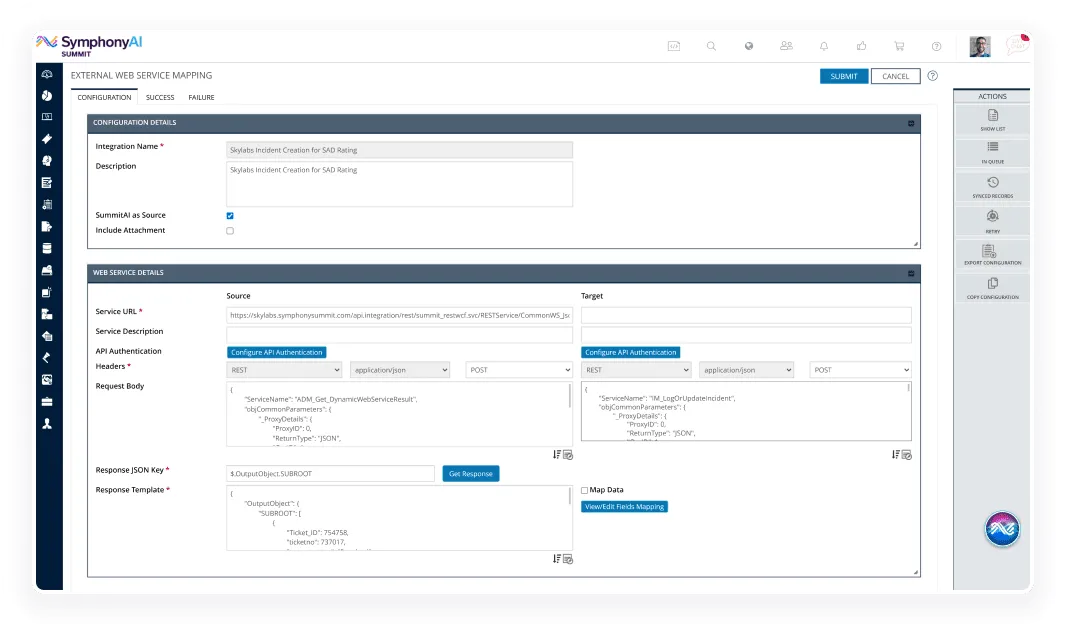
Screenshot of SymphonyAI Summit's External Web Service Mapping interface showing Configuration Details and Web Service Details for setting up API integration with fields for Integration Name, Description, Service URL, API Authentication, Headers, Request Body, Response JSON Key, and Response Template, including buttons for submitting, getting response, and editing field mappings.

The SymphonyAI Integration Hub gives your IT team the tools to connect any enterprise system, automate data exchange, and maintain full visibility without heavy lifting.

A symmetrical geometric design with four large purple diamonds arranged around a smaller central purple diamond.
REST API integration

IT Service Management (ITSM) systems often expose REST APIs in order to integrate with Incident, Service Request, or CMDB to enable the seamless communication and collaboration between the two systems. By leveraging REST API integration, organizations can automate data exchange, streamline business processes.

Purple shield outline with a checkmark inside representing security or verification.
API authentication

Verify the identity and permissions of a client or user accessing an API.

Purple network tree diagram with three connected square nodes, one node below and two nodes side by side above, linked by lines.
Data mapping

Define relationships and transformations among the data fields from different systems or applications for seamless integration and data synchronization.

Two purple arrows pointing in opposite directions, one pointing right above and one pointing left below, symbolizing exchange or swap.
Import/Export template

Provides a standard and consistent way of defining the structure, layout, and required data elements for importing or exporting configuration data from third party applications.

Purple clock showing the time as 3:30 with a thick circular outline and bold hands.
Scheduler

Allows users to define and automate the execution of tasks at predetermined times or according to specified schedules.

Two stacked purple rounded rectangles representing a queue or stacked items icon.
Message queue

By using a message queue in the order processing system, the ITSM platform can efficiently handle high volumes of orders, distribute the workload among multiple 3rd Party Application to maintain order integrity, and ensure fault tolerance.

Purple icon of a receipt with a top edge resembling a zigzag tear and two horizontal lines with dots representing text and bullet points.
Audit logging

Record and document events within a system for investigations. The SymphonyAI Integration Hub lists transaction audit logs indicating the success and failure status of each transaction.

Purple notification bell icon with two curved lines on each side indicating an active alert.
Notifications

Generating timely alerts to notify stakeholders about significant events, like setting notification for failed tickets, such as incidents, service requests, or work orders.

Integration with 100+ tools

IBM logoAWS logoMicrosoft Intune logo with blue Windows flag icon and text.Bosch logoWipro logo with stylized text and a circular dotted pattern.SAP company logo in white letters on a blue triangular background.Jira Software logo with a blue diamond-shaped icon to the left of the text.Abstract logo with two overlapping dark blue parallelograms and two small circles inside the front shape.
Toshiba brand name in bold red capital letters on a transparent background.Workday company logo with an orange arch above the blue lowercase text.Microsoft Dynamics CRM logo with a stylized blue sail-like graphic next to the text.BMC Helix logo with an orange stylized 'B' icon followed by the words 'bmc' in gray and 'helix' in blue.Red outline of a cloud with the text 'ORACLE INTEGRATION CLOUD' inside it, with ORACLE in red and Integration Cloud in black.Jamf company logo featuring a stylized blue square design to the left of the lowercase 'jamf' text in gray.Splunk logo featuring the word 'splunk' in lowercase black letters accompanied by a small green upward-pointing arrow above the letter 'k'.LANDESK logo with three blue arrows pointing right inside a blue square to the left of the text.
OTRS logo with interwoven curved lines in blue, red, black, and brown forming a circular pattern to the left of the text.Orange abstract circular shape with curved and straight lines forming a stylized design.ServiceNow company logo.Entellio logo featuring a circular design with overlapping geometric shapes in shades of red, purple, and blue, above the word 'entellio' in lowercase letters.SOTI company logo.McAfee company logo with stylized red shield emblem and red text.Blue circular HP logo above the words 'HP Service Manager' in blue text.BMC Discovery logo with a stylized orange and brown icon followed by the text 'bmc' in brown and 'Discovery' in orange.Tata Communications logo featuring the word TATA in uppercase blue letters beneath a stylized blue emblem, with the full name TATA COMMUNICATIONS in uppercase blue letters below.
White pencil and ruler crossing each other forming an X shape.
Design Studio

Create workflows and roll out new services at lightning speed. Build inspirational design and personalized experiences that your user will love.

Magnifying glass icon with a check mark inside the lens.
Discovery

Get complete visibility of your IT landscape – on-premises and in the cloud. Discover your IT assets and keep your CMDB and asset registers up-to-date.

White shield outline with a padlock symbol in the lower right corner, representing security or protection.
Security and Trust

Enjoy the peace of mind that comes with enterprise-grade security compliances.

Ready to see the Apex Aspen ITSM platform in action?

See why the world’s top IT and enterprise service teams are adapting faster, executing sharper, and winning bigger with AI for ITSM.

Two colleagues collaborate at a computer workstation in an office setting; one person sits wearing headphones around their neck while the other stands beside them looking at the screen.