Process industry

Ensure optimal functioning of installations, maximize output, and guarantee product quality and safety.


A man wearing a white safety helmet, glasses, and a yellow high-visibility jacket is working on a computer in an industrial or factory setting.
Abstract digital artwork featuring fluid, layered shapes in translucent blue and purple hues with white curved lines, set against a soft gradient background.
Nippon Gases case study

Industrial gases company prevents unplanned downtime and extends its APM strategy with SymphonyAI’s Predictive Asset Intelligence

In order to ensure that things are done “first time right”, thousands of Standard Operating Procedures and Work Instructions are created and distributed throughout the organization. Each of these documents provide a step-by-step description of how a process or activity should be done. Unfortunately,

documents are fine for reading at a desk, but hardly usable while working. While these documents are created with the best intentions, no one really knows whether they are truly followed as there is no execution trace.

Proceedix is a digital inspection and instruction workflow execution platform. The core of our system is not a form but a workflow specifying each task of an instruction or inspection and indicating how it should be done right. Each time a workflow is performed, every step of the process is logged in a unique execution report.

The Proceedix platform has various features particularly designed to cope with typical instruction and inspection execution requirements in process industries.

Typical use cases of Proceedix in the process industry include:

  • Line cleaning and changeover instructions
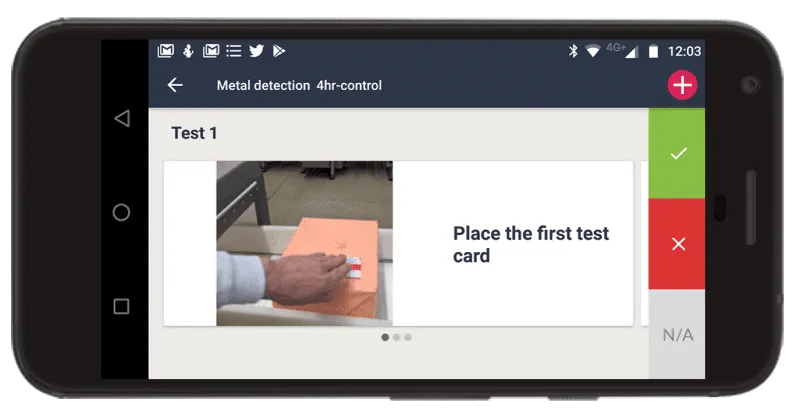
  • Product and line safety controls such as metal detection checks
  • Transport loading and unloading instructions for dangerous goods
  • Team leader “walk the floor” activity
  • Sample collection and processing instructions
  • Periodical asset inspections
  • Audit, including food processing, 5S, GMP, and more
Graphic of a web browser window with a factory icon inside, accompanied by a gear symbol and three horizontal lines representing settings or controls.
Conditional workflow paths

Workflow editor functionality that allows you to determine which specific tasks the operator should do, depending on the situation at hand.

Central vertical yellow line with five yellow circles connected by yellow branches; overlaid with a blue circular trio of arrows pointing counterclockwise.
Integration API

Module enabling a bi-directional connection of Proceedix with ERP/MES/LIMS/CMMS.

Yellow factory icon with three blue binary code clusters above and to the left of it.
Dynamic inspection tolerances

Workflow feature allowing you to define dynamic tolerances on operator input values, depending on the product or asset inspected.

Blue silhouette of a human head facing right overlaid with gold binary code and a yellow factory building with three chimneys to the left, symbolizing industrial innovation or manufacturing intelligence.
Issue escalation mechanism

Workflow mechanism enabling the operator or inspector to escalate an issue to the right team in “a click” with full execution traceability.

Illustration of a blue web browser window with three yellow circles on top and a yellow cloud behind it, showing white arrows pointing up and down to symbolize data transfer.
Workflow execution with ATEX devices

Proceedix instructions and inspections can be executed with any Windows, Android, or iOS ATEX tablet, phone, or smart glasses.

Graphic of a web browser window with a factory icon inside, accompanied by a gear symbol and three horizontal lines representing settings or controls.
IoT card

Workflow feature to display smart sensor information in any task of an instruction or inspection.

Illustration of a factory building with a tall chimney and three triangular roof peaks, accompanied by two large gears in front and a yellow swoosh above the factory.
Manufacturing Operations Management

Track what’s important and gain insights from the hidden data behind your product execution process.

Learn more
Blue document icon with three white vertical bar charts and a yellow magnifying glass overlaying the left side of the document.
Manufacturing Analytics

Real-time operational insights, actionable metrics, and industry-specific calculations.

Learn more
Hand holding a speedometer with the needle pointing to the right and a blue badge overlay with a white checkmark symbolizing verified performance.
Performance and Reliability

Unite trusted technology with cutting-edge AI.

Learn more
Blue silhouette of a person with overlapping yellow curved signal waves and a blue circle containing a white dollar sign, symbolizing financial communication or connection.
Connected Worker

Connect deskless workers with step-by-step instructions and inspections.

Learn more